WINDOWS HEARTS EMULATOR
NOT OPTIMIZED FOR MOBILE
For the best experience, play on a desktop computer with a mouse.
Classic Windows card game
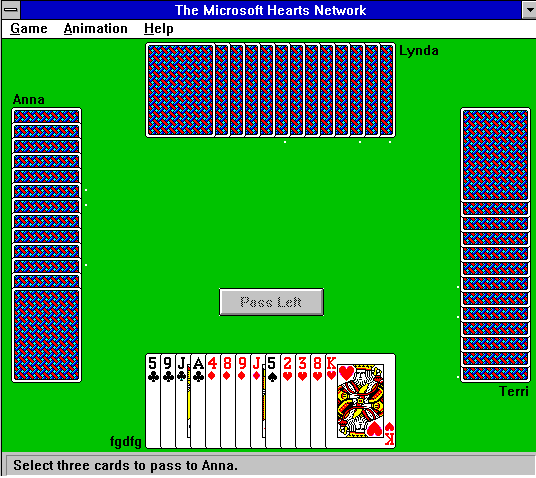
Hearts.exe: The Microsoft Hearts Network
Hearts combines careful card play, unpredictable opponents and one very dangerous card: the Queen of Spades. This browser-based version recreates the feel of a classic Windows game, complete with the familiar green table.
How Hearts Works
Four players each receive 13 cards. Follow the leading suit when you can, and try not to take tricks containing penalty cards. At the end of each hand, the players count the penalty points they captured.
- Hearts: Every heart is worth 1 penalty point.
- Queen of Spades: Worth 13 penalty points.
- Passing: In most hands, choose three cards to pass before play begins.
- Goal: Finish with the lowest score.
Learn the full Hearts rules and gameplay strategy →
Three Useful Strategies
>> WATCH HIGH SPADES
Keep track of the Queen, King and Ace of Spades; the higher cards can be dangerous.
>> SHORTEN A SUIT
If you can get rid of a suit, you gain flexibility to discard unwanted cards when that suit is led.
>> DON'T CHASE EVERY TRICK
Winning a trick is not the goal. Avoid taking penalty cards unless you have a deliberate plan.
The Windows Connection
Microsoft Hearts appeared with Windows for Workgroups 3.1 in 1992. Unlike the familiar solo games Solitaire and Minesweeper, the early Hearts program could also bring people together across a local network—a clever demonstration of Windows networking.
Read the history of Microsoft Hearts →
Frequently Asked Questions
What is shooting the moon?
Collecting all 13 hearts and the Queen of Spades in the same hand is called shooting the moon. In the usual rule, your opponents each receive 26 points instead of you.
What does “breaking hearts” mean?
Hearts are broken when a heart is discarded into a trick for the first time. Normally you cannot lead a heart until this happens, unless you have only hearts left.
Can I play Hearts full screen?
On desktop, a Fullscreen link appears above the game once the embedded game reports it has started.
Does the game work on mobile?
This Windows-style emulator is primarily designed for a mouse and desktop browser.
Explore More Retro Games
For games from other classic computer and console platforms, you can browse the collections at ClassicGamesDB.